Total Pageviews

Showing posts with label Assault Rifle Model. Show all posts

Sunday, 17 March 2013

WEAPON MODELLING: WEAPON UV MAPPED

     Managed to get the issues fixed. Turned out it wasn't an issue, it was just me being an idiot. I hadn't ironed out the faces, hence the weird UV Mapping issues and absent checker textures. Anyway, I got it done, and hopefully there are no issues (no doubt there will be many). Now all I need to do is is bake the normal map onto the low poly. 

I had some issues with distortion and I ran into some issues with my topology, but I eventually got it done. Have a look below. I think it's looking okay.


WEAPON MODELLING - LOW POLY UV MAPPED
By Christian Whelan
WEAPON MODELLING - COMPARISON
by Christian Whelan

   To be honest, my weapon is so rigid that I don't really think the UV map will do that much visually. I suppose I'll just have to wait and see - I'm going to get the baking done now. Good job I wrote a blog on how to do it!

NEXT POST: WEAPON MODELLING - NORMAL MAP AND COMPLETE MAP

Saturday, 16 March 2013

WEAPON MODELLING - TEXTOOL UV MAPPING ISSUES

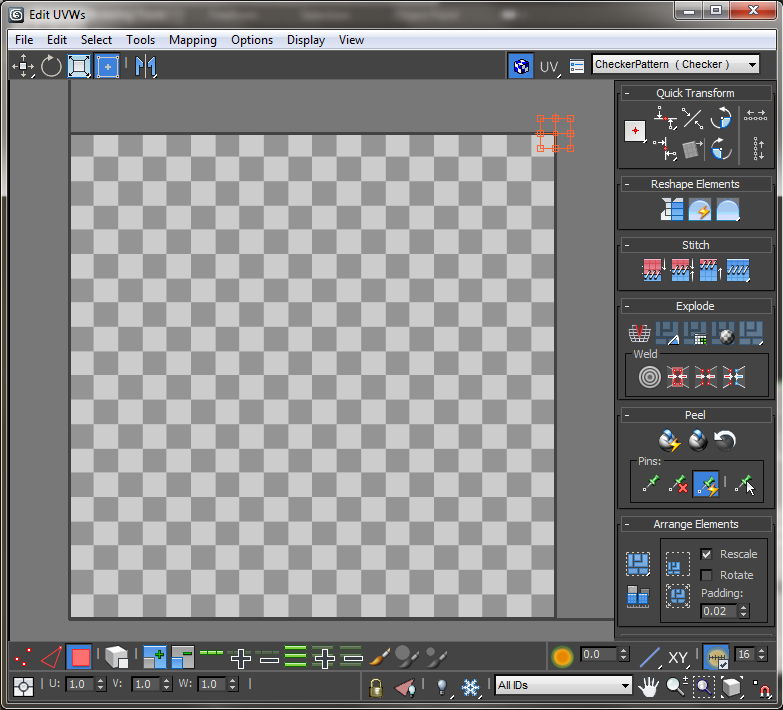
      So I installed Textools into 3Ds Max and intended to get the UV Mapping and normal map baked within an hour. Unfortunately the issue with my disappearing faces that I thought I'd fixed previously, decided to make a surprise entrance again. I seriously have no idea what to do this time. 

When I apply the checker texture and edit the UV Map (using Textools), the object reverts to a dark grey colour and disappear on the UV Map (as you can see below)

WEAPON MODELLING - UV MAPPING ISSUES
WEAPON MAPPING - UV MAP ISSUES

I've tried this on several objects.The primitive shapes that make up parts of the weapon are fine, it's just the polygons I'd drawn in myself that are having the problems (the ones that make up 90% of the weapon). If someone could help me with this I'd greatly appreciate it.

I'll browse forums in blind hope for now. Hopefully, I'll get this problem fixed by Monday.

NEXT POST: COMING SOON!