Total Pageviews

Showing posts with label Specular Map. Show all posts

Sunday, 7 April 2013

WEAPON MODELLING: SHOTGUN DEVELOPMENT AND COMPLETE

      Somehow I've managed to overcome a thousand different crippling issues with my Shotgun Model. Even after begin told to start a new model half way through the assignment, I managed to get this done - it's a miracle!

   To be honest, I love the design and final result, but there are clearly a few flaws in it. What I will say though, is that these flaws could of been fixed if I had the time. I had issues with the Diffuse Map (not showing true colors), the Specular Map (not reflecting light correctly) and baking (low poly / high poly translation issues). Even so, I think the final shotgun turned out as well as it could of done given the time I had and the issues I overcome and still need to overcome.

   For my final hand-in of the year, I shall (along with all the previous sheets) these three presentation sheets showing the development of the shotgun model and it's final result.


COMMENTS AND CRITICISMS APPRECIATED!

WEAPON MODELLING: FINAL MODEL
by Christian Whelan
WEAPON MODELLING: SHOTGUN DEVELOPMENT
by Christian Whelan
WEAPON MODELLING: SHOTGUN BAKED TURN-AROUND
by Christian Whelan
WEAPON MODELLING: FINAL MODEL AND MAPS TURN-AROUND
by Christian Whelan
  
     From my last post on the shotgun model and it's Specular Map, I think the final model has decreased in quality. I think this is largely due to my issues with the Specular Maps and Diffuse Map. I wish I could of fixed it but hopefully this will do (for now).

  Actually, just this second, I've realized I've been an idiot. My diffuse texture is higher than the 1024x1024 limit out tutor has set. I guess that and the final presentation sheet will have to be changed! Brilliant...

NOTE: THE FINAL PRESENTATION SHEET ON THIS POST IS THE FINAL ONE NOW

NEXT POST: WEAPON MODELLING: MARMOSET RENDERING

WEAPON MODELLING: ASSAULT RIFLE DEVELOPMENT AND BAKED

     Coming up to the deadline for the last assignment of the year now - research, design, develop  texture and present a first person shooter gun in 3Ds Max.

   I started this assignment a month and a half ago with a weapon I researched, designed and modeled thoroughly. Unfortunately, this weapon was not up to the standard it should of been, or at least the issues found in the weapon would render any further progress below standard - I had to start again. My tutor did say however, that I could finish this weapon whilst starting a new one. Due to other course commitments, I haven't managed to finish the Assault Rifle, however, this is not to say I won't over summer.

   It seemed a waste to just drop the weapon to the side and continue on with a new weapon, so I decided to include the Assault Rifle (unfinished) in the final hand-in. This Assault Rifle, which I developed until baking the Normal Map, is below in two presentation sheets.


WEAPON MODELLING - ASSAULT RIFLE DEVELOPMENT
by Christian Whelan
WEAPON MODELLING - ASSAULT RIFLE TURN-AROUND
by Christian Whelan

      The presentation sheets really say all I need to say, so overall, I was and am really happy with how it turned out. Yes, it has topology issues, yes it has smoothing issues and yes, the symmetry screwed up the barrels and the side specific features. But regardless of this, I think considering it was my first attempt at modelling anything even remotely complex, it turned out great. It' s a complex weapon, and I think considering the ambition I put into this design, I pulled it off pretty nicely.

Can't wait to texture this!

NEXT POST: WEAPON MODELLING: SHOTGUN DEVELOPMENT AND COMPLETE

Friday, 5 April 2013

WEAPON MODELLING: SPECULAR MAP (COMPLETE)

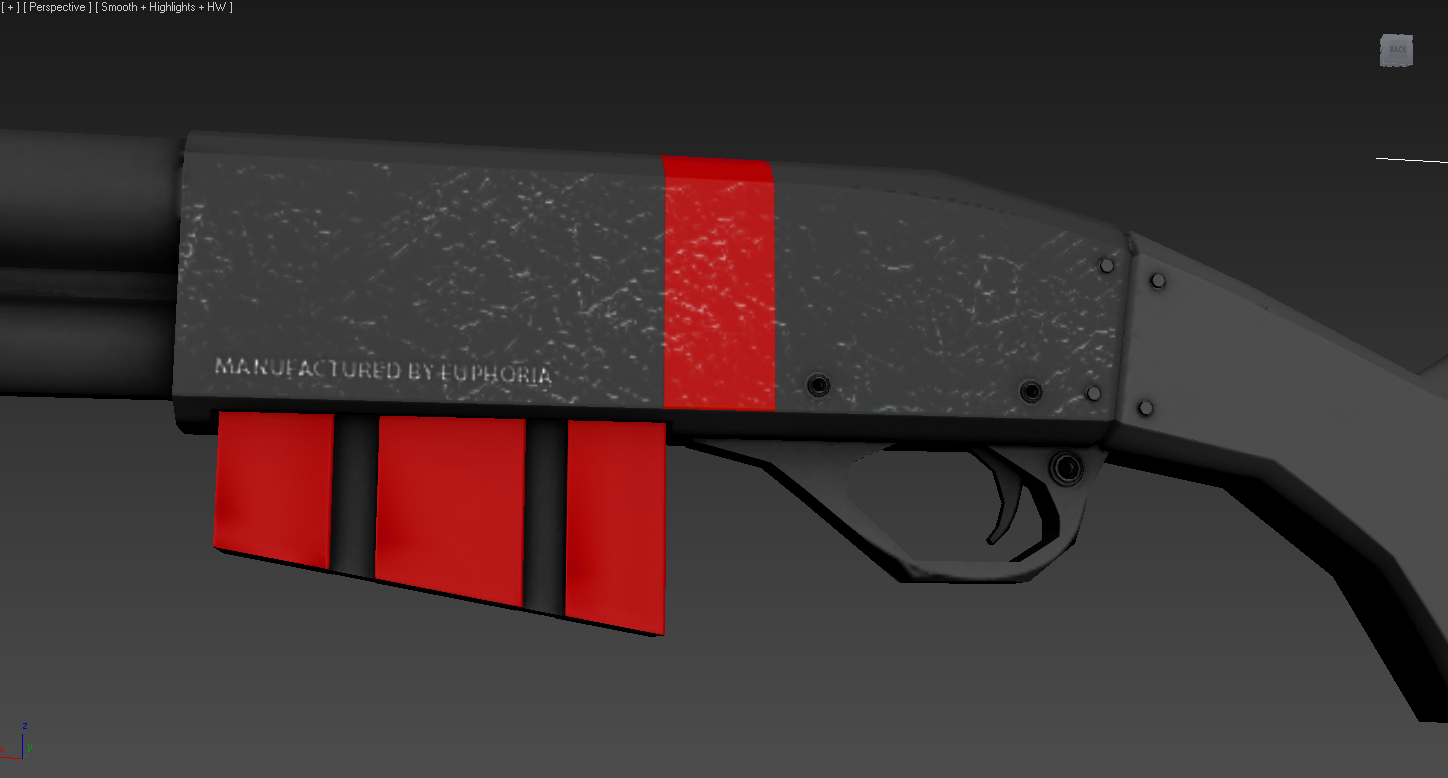
       Didn't take me as long as I thought it would, but I finished my Specular Map and I think it's looking pretty good. I could of just put one single texture over all of the UV Islands, and I did initially (in a rush), but it just looked crap. The texture was larger in some areas, but smaller in others, and it just made it look cheap - plus, it's lazy. 

So I decided to take it home and battle against my terrible computer to refine it, adding in highlights where I thought necessary etc but the one thing I'm really pleased with, is the etched writing and logo in the weapon, I think that takes the ordinary shotgun and makes it a little more interesting. Have a look!


WEAPON MODELLING - SHOTGUN MODEL (IN PROGRESS)
by Christian Whelan
WEAPON MODELLING - SPECULAR DETAILS
by Christian Whelan
WEAPON MODELLING _ SPECULAR MAP
by Christian Whelan

     I used a different texture for the pump, and a different texture of the stock, because like I said, one texture just didn't make sense, this is a weapon of multiple parts after all.

        So, now all that left to do is actually paint it. To be honest, I don't think that is going to take very long, because as it stands, the test Diffuse Map I have on the weapon at the moment is pretty close to what I want, so all I'm going to do, is transfer the scratches of the Specular over to the Diffuse, lower the opacity, and then finally  add some texturing to the red paint (scratches etc). Once that's done, the weapon is done, even if there won't be much difference between the Specular and Diffuse - I'm not going to paint it green for the sake of it.


NEXT POST: WEAPON MODELLING: ASSAULT RIFLE DEVELOPMENT AND BAKED

WEAPON MODELLING: SPECULAR AND DIFFUSE MAP (IN PROGRESS)

        Ok, for some annoying reason, the blog posts I'd done today (3 of them) haven't posted or saved, so I have to start again... brilliant.

    After an attempt at baking the Normal, Complete, Specular and Diffuse map. I started again and refined the Normal and Complete Map bake. From there, I've now began to add the details into the Specular Map. I really want this to look good, so attention to detail is my goal for the rest of the day. Once that's done, the Texture will be more effective - it's a knock on effect.

    Anyway, I've done the majority of the weapon, adding in the highlights using white brushes, Photoshop Effects and Ndo as I go along to refine the lighting information in-engine (Xoliul Shader 2). Have a look!


WEAPON MODELLING - SPECULAR MAP IN PROGRESS
by Christian Whelan
WEAPON MODELLING - SPECULAR MAP IN PROGRESS
by Christian Whelan
WEAPON MODELLING - SPECULAR MAP IN PROGRESS
by Christian Whelan

NOTE: The last two screenshots are less developed than the first
 screenshot - I added in bolder scratches along the edges of the weapon.

WEAPON MODELLING - SPECULAR MAP - IN PROGRESS
by Christian Whelan

 As it stands, I'm more than pleased with the results, the problem is now, I have to complete the rest of the weapon on my home computer.... the one that struggles to run solitaire. So it's going to be a battle between man and machine for the weekend.

In addition, as I apply the maps one by one, it looks like the Specular Map is dulling the Normal map ever so slightly. It's fine, but when the lighting isn't hitting the Specular Map properly, it looks bland. Maybe I'll overlay the Normal Map onto the Specular to regain that information, then desaturate and invert it, that might do the trick!

NEXT POST: WEAPON MODELLING: SPECULAR MAP BAKED


WEAPON MODELLING: COMPLETE MAP AND NORMAL MAP (BAKED)

    After my initial attempt at baking the maps onto the shotgun, I started against in an attempt to do it 'properly'. So far, I've only baked the Normal Map and the Complete Map, but already, it's looking much, much, much better. Thank god! Have a look below.

WEAPON MODELLING - NORMAL AND COMPLETE MAP
By Christian WHelan


Now I just need to sort out the Specular to I can get painting the shotgun.

NEXT POST: WEAPON MODELLING: SPECULAR AND DIFFUSE MAP (IN PROGRESS)

WEAPON MODELLING: SPECULAR TEST (ISSUES)


     Somehow, I've made some progress with the Specular Map. The hardest part is getting my head around which map goes where. I've just this second, had a brainwave when looking at google for some desperate inspiration. Before this brainwave, I had a midly succesfull attempt at using the Specular, Diffuse and Normal Map together. This is below;
 
Note: This attempt does not include the Complete Map.
 
WEAPON MODELLING: SPECULAR TEST
by Christian Whelan
 
To get my head around the different maps and their use in 3Ds Max, I used this google image showing each of the different maps - it's really helpful. Thank god I found it!
 
DIFFERENT MAPS EXAMPLE
LINK 
 
So now all I need to do, is get each map into Photoshop and saved seperatley, then paint the texture and add the Complete Map to the Diffuse. Hopefully, by the end of today, I should have everything done besides the Diffuse Map (I'll paint that another day).
 
NEXT POST: WEAPON MODELLING: COMPLETE MAP AND NORMAL MAP (BAKED)
 

Friday, 15 February 2013

WEAPON MODELLING: WEAPON MOODBOARD

      The last large 3D Modelling assignment of the year is here - it is huge! I've had experience in 3D modelling, I've had experience in texturing and finally, I've had 'some' experience in mapping. The final assignment tasks us with applying all of this knowledge to a first person shooter gun that we have have to research, concept, model, texture, map and render. It's the full development process of any in-game object. So, I've made a plan of how to get this done in an organised fashion. Hopefully, this also means a credible and successful fashion.

1. Moodboards – Weapons
2. Visual Styles Research
3. Silhouettes Sheets
4. Moodboard – Chosen Weapon
5. Research Sheet(s)
6. Design Sheet
7. Turn-Around
8. Development Sheet
9. Low Poly Sheet
10. High Poly Sheet
11. Real Time Render of Textured Model
12. Texture Set Sheet
13. Final Real Time Render

    Again, I'm being ambitious, and it will stress me out beyond belief. But I'll get it done, hopefully. I've already got the first sheet done in an attempt to understand firearms a bit better visually. Now I have this reference sheet, It's time to look at different visuals styles and begin to brainstorm weapon ideas with this research in mind.

GUN MODELLING - WEAPON MOODBOARD
by Christian Whelan

    I'm still slightly torn on what weapon type to go for. Do I go for a weapon I want that is less interesting as an object? Or do I go for something I don't that has more complex geometry. Once I decide on the weapon, I'll complete the second sheet - a moodboard / reference sheet for that weapon type. Only then, can I really get started on this assignment.

NEXT POST: WEAPON MODELLING: VISUAL STYLES RESEARCH

3DS MAX: OIL BARREL SPECULAR MAPPING

        Previously, I had modelled and baked an Oil Barrel as a first attempt at normal and difuse mapping. To take it to the next level, we had our first attempt at using Specular Maps to add texture and depth. When an Oil Barrel in a game looks complex, but it's actually flat, uninteresting object, that's normal mapping and diffuse mapping. When the lighting bounces of the even the tiny scratches on that barrel, but again, it's still just a flat, geometrically uninteresting object, that Specular Mapping. 

     Using all these mapping technique in cooperation, developers can make a basic primitive barrel shape look like a dented, rusted and scratched oil barrel. What does this do? Well, it saves processing power for those more important in-game details whilst just simply making the game look believable for the player. I had my first attempt at this technique, the before, after and maps are below.

COMMENTS AND CRITICISMS APPRECIATED!

THE BARREL - THE MAPPING PROCESS
by Christian Whelan
THE MAPS - THE MAPPING PROCESS
by Christian Whelan
   
  It's hard to tell the difference between the two maps on the second GIF, but at its basics, I took the original Diffuse Map and overlaid a textured using an Ndo extension. This allowed me to convert the image and tweak the extensions various effect. If I wanted the scratched texture to be more bold, I could of done so, but as you can see from the before and after GIF of the barrel, it was effective enough.

NEXT POST: WEAPON MODELLING: WEAPON MOODBOARD