Total Pageviews

Showing posts with label Silhouettes. Show all posts

Thursday, 4 April 2013

WEAPON MODELLING: ASSAULT RIFLE BAKED (NORMAL MAP)

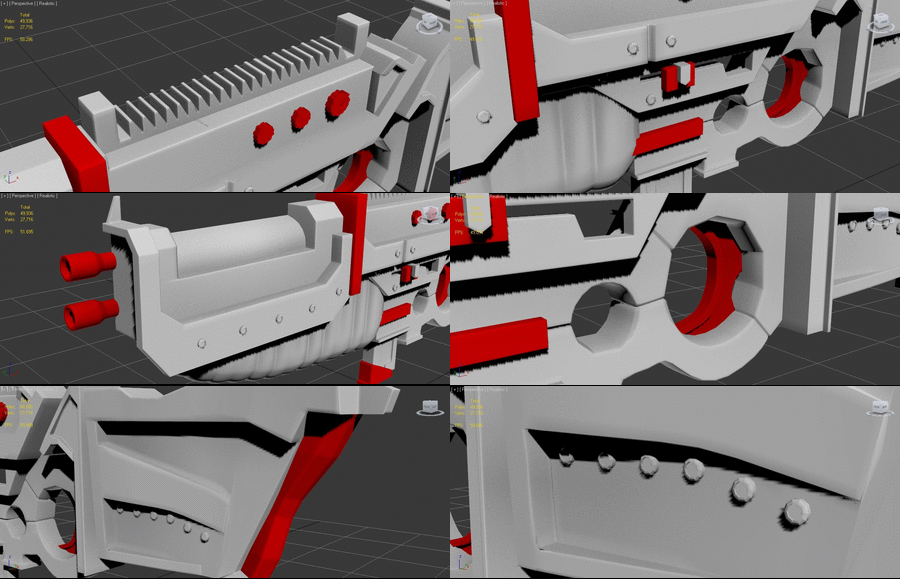
     I've not touched this weapon in a few weeks now, and now I've gone back to it, I'm absolutley gutted that I couldn't finish it. Not that I don't like my shotgun, it's just that I think this looks better overall, even with the inconsitencies and dodgy baking - it's just a better weapon. I spent hours on this best and it's cool as hell!

Anyway, before I was told to start again (which was fair), I baked the high poly Normal Map onto the low poly and came out with a pretty snazzy looking weapon.

WEAPON MODELLING - REFERENCE CONCEPT
by Christian WHelan
WEAPO MODELLING - ASSAULT RIFLE BAKED
by Christian Whelan
WEAPON MODELLING - ASSAULT RIFLE BAKE TURN AROUND
by Christian Whelan
WEAPON MODELLING - ASSAULT RIFLE NORMAL MAP
by Christian Whelan
 
     There are serious issues with this weapon on all sides to be honest. The gun's barrels are way to thin, mainly because my use of symmetry was terrible, and the trigger, the grip and stock havn't smoothed properly, leaving a choppy looking weapon. Regardless though, I still think it's a good attempt considering it's was my first attempt at modelling anything remotely complex (the Old West Cart was terrible looking back at it).

NEXT POST: WEAPON MODELLING: SPECULAR TEST (ISSUES)

WEAPON MODELLING: MAPPED MODEL / UV MAP

     My computer seems to be dying a slow death, but as it hangs onto it's life, I managed to get the low polygon shotgun model mapped, and exported the UV. I 'thought' I ran into a massive issue, but thankfully, it was just my stupidity - I still had the subdivision tools selected and the Nitrous driver was causing some graphical problems...

Anyhow, with a little help from the lifesaver that is Textools, I've produced a pretty good UV Map - it's organised, as efficient as it can be, and hopefully, once its baked, it will be as effective as I hope it will be. Although, I think that in some areas, the difference in topology between the Low Poly and High Poly models will become detrimental to the quality of the overall bake. I hope not, otherwise I'd have to UV Map the entire thing again...

WEAPON MODELLING - SHOTGUN UV MAPPED
by Christian Whelan
WEAPON MODELLING - UV MAP
by Christian Whelan
 
This UV Map will come in handy when it comes to painting the shotgun's texture.

NEXT POST: WEAPON MODELLING - SHOTGUN BAKED (NORMAL AND COMPLETE MAP)

Monday, 25 March 2013

WEAPON MODELLING: SHOTGUN HIGH / LOW POLY

      3 hours from start to finish, I've managed to develop a shotgun using two references two create a more unique weapon , rather than a bog standard shotgun. Personally, I absolutely love the results. Don't get me wrong, there were a few issues along the way, and it was a slog adding in all the supporting geometry. But in the end, even though there is still one graphical inconsistency (the bottom barrel thingy...), it doesn't matter, because it's only a minor detail. Thank god the hard part is over. Have a look at both versions below!

Oh, I haven't made the .GIF files yet, but I'm sure they'll screw up like they usually do...


COMMENTS AND CRITICISMS APPRECIATED!

WEAPON MODELLING - LOW POLY SHOTGUN
by Christian Whelan
WEAPON MODELLING - HIGH POLY SHOTGUN
by Christian Whelan
WEAPON MODELLING - COMPARISON .GIF
by Christian Whelan
WEAPON MODELLING - DETAILS COMPARISON
by Christian Whelan

       Ok, so maybe the .GIF images didn't screw up (makes a change). As you can probably tell, the majority of the turbo smoothing just gives the shotgun those nice lines and curves, but when the supporting topology is most present (the pump, the barrel and the trigger), you can really see the difference, and if successful, it will show when I bake the normal map to the low poly model.

     So that's it, it done. This time, I've made show there are no inconsistencies, and that I added in all the side specific details 'after' I added the symmetry modifier. The result, hopefully, is a model that will look good at all future stages, leaving me with a nicely modelled, mapped and textured weapon. 

It's a shame I didn't pay this must attention to detail on my first model!

NEXT POST: WEAPON MODELLING - MAPPED MODEL / UV MAP

Sunday, 24 March 2013

WEAPON MODELLING - MODELLING A NEW WEAPON

I have to start a new model, UV Map it, and bake it from scratch. Here's why.

       As much as I hated the idea, I 'have' to start a new model for the assignment. It's not just the fact that I had spent hours researching, designing and developing the model, it's that I actually loved my design - I was over the moon with my model. Unfortunately, after UV Mapping and baking it, I took it into university to receive some tutor feedback. If you look below, you can see that the weapon's stock doesn't smooth out as well as my tutor wants (I agree with him), additionally, being the stupid guy I am, I forgot to use symmetry early in the development  The smoothing issue was both mine an his fault, but the symmetry predicament is all down to me. 

WEAPON MODELLING - SMOOTHING ISSUES
by Christian Whelan
   
  I could continue with this weapon, texture it, add a specular map and present it, but these two issues will effect consistency in design, and the quality of the texture and specular map. So, rather than present a ugly looking model at the end (even though I spent a long time on it), my tutor feels its better for me to start a new and simpler model to continue the assignment - he advised I model a basic shotgun.

     The silver lining in this is that all the hardest parts are over, and my tutor likes the result. So he accepted my assault rifle model for this submission and is allowing my to continue on with a simple shotgun as if nothing happened. Which will one, turn out looking better and two, be easier to texture and present. 

     Not all is lost though, he says I can continue developing the assault rifle simultaneously if I feel strongly about it, and I will. By doing that, I'll have two weapons to hand in for the assignment, not just one. It's a win/win scenario on the most part. 

I'll start modelling the shotgun now.

NEXT POST: WEAPON MODELLING - SHOTGUN LOW / HIGH POLY

Saturday, 16 March 2013

WEAPON MODELLING: LOW POLY MODEL

          I overcome the hurdle I had yesterday. As it turns out, all I had to do was save the model as a 3Ds Max 2012 format. Unfortunately  that meant I needed the 2013 version only available in University for some strange reason.   

    Anyhow, after finishing the development of the high polygon model and tidying up its topology. I needed to take the high poly model, and remove the majority of its supporting topology to create the low polygon model. The reason for this is because the next stage of development is the UV Mapping and baking.

    Eventually I'll do this by projecting the maps of the high polygon model onto the low polygon model, to give the illusion that the low polygon model is in fact the highly detailed high polygon model. This is why I need both versions - to help with mapping, texturing and rendering.

    Now the cleaning of the topology was done, I deleted the supporting topology, ensuring that no vertices or edges crucial to the weapons base shape were removed. What was left (as shown below) is a weapon model with less tris and less detail, but a weapon that would run faster in an engine, saving processing space for more details in-game. The final Low Poly model is below.


ORIGINAL DESIGN - REFERENCE
by Christian Whelan
WEAPON MODELLING - LOW POLY
by Christian Whelan

All I need to do now is bake the high poly model to the low poly model. Then I can paint the texture and add the diffuse and specular maps.

NEXT POST: WEAPON MODELLING - TEXTOOL UV MAPPING ISSUES

WEAPON MODEL - ISSUES WITH 3DS MAX 2013

Unfortunately, I've ran into a speed bump with my model development. 

      At home, I use the 2012 version of 3Ds Max. At university, I use the 2013 version. The reason for this is because for some strange reason (especially now) 2013 will not install on my computer. It says it is already installed, even though it isn't anywhere to be found on my computer. The issue here, is that the model was last developed in university on the 2013 version of 3Ds Max, therefore  it is not compatible with the 2012 version.


     The only way I can use the model in the 2012 version of 3Ds Max is to convert the model into an OBJ file using the 2013 version. Obviously I don't and cannot have that. 


Development wont be possible until either Friday the 15th or Saturday the 14th. I'd have to get UV mapped in that day to hit the milestone hand-in on time.


NEXT POST: WEAPON MODELLING: LOW POLY MODEL


WEAPON MODELLING: MODEL PROGRESS 09/03/2013

         I took my seemingly finished high poly model to university for my tutor and it turned out that although it was a nice design, it's topology was a mess (as I suspected). A golden rule is to never have five sided polygons on your objects - it's a nightmare when it comes to smoothing, mapping and rendering. Stupidly, because I am forgetful, I thought five sided polygons where defined by there actual distinctive sides.... I was wrong. It turns out polygons are determined by their vertices. When this fact was realised, it turned out my weapon was made out of five sides polygons (oops...). To be honest, I thought it was hilarious haha Then I realised I had to spend the next three hours fixing the damn thing! 

Anyway I got it done and the slightly noticeable result is below.

WEAPON MODEL - HIGH POLY COMPLETE
by Christian Whelan

Now the model is done, it's time for the next stage - mapping, texturing and baking. My favourite part...

NEXT POST: WEAPON MODEL - ISSUES WITH 3DS MAX 2013

Sunday, 3 March 2013

WEAPON MODELLING: MODEL PROGRESS 01/03/2013

         Well yesterday was my 21st birthday, so I didn't really make any progress on my model, thankfully I'd already made some good progress on it the night before. Anyway, the fun is over now, so I sat at my laptop for a good hour adding in the supporting geometry until my laptop decided to commit suicide and corrupt the single and only version of the model... brilliant - two weeks of work gone.

   By some miracle of good luck, it turns out 3Ds Max 2012 has a Auto Back-Up feature. So just when all seemed lost, I managed to open to most recent backup found and re save my file 4 times in 4 separate places. It's set me back a good couple of hours but at least not all was lost. I won't be making that mistake again.

     Anyhow, I made a clone of the gun, added in the supporting geometry (not an easy task when you have an object full of hidden tris and 3 sides faces) and applied the turbo smooth to each of the sections. However it turned out I forgot to add in two huge details - the pull back bullet gun thing (on the side) on the rivets that give the gun some depth.

It turned out great I think! Have a look.


COMMENTS AND CRITICISMS APPRECIATED!

|WEAPON MODELLING - ORIGINAL CONCEPT
by Christian Whelan
WEAPON MODELLING - MODEL TURN-AROUND (HIGH POLY)
by Christian Whelan

    It didn't come without a few issues. The more complex sections of the weapon were a real struggle when it came to adding in loops and cuts. In fact, I'm still unsure whether or not my topology is at a high standard. It seems messy in some parts, or maybe that's just me. After all, I've been staring at it for a good few hours now. 

Anyhow, I added in all detail that give the weapon it's 'character' and depth. The GIF below shows these and when I finally polished out the imperfections (which I'll be made aware of on Monday) I'll be able to map and texture it. Can't wait...


WEAPON MODELLING - MODEL DETAILS
by Christian Whelan

NEXT POST: WEAPON MODELLING: MODEL PROGRESS 09/03/2013

Saturday, 2 March 2013

WEAPON MODELLING: MODEL PROGRESS 27/02/2013

        So I finally got the basic low poly model completed. There are a few details here and there that I still need to polish out, but so far, I'm fairly happy with the results. The parts that need polishing? The grip is bothering me a bit, (I cant put my finger on it) and the barrel area of the gun isn't connected and has confusing topology.

     Of course, I've only modelled half of the weapon - the aim is to UV Map one side and mirror it . The issue is, on the multiple occasions I've done this, the edges just don't match up no matter what I try. Because of this, light bleeds through the gap or clipping occurs, leaving in it's place an ugly render. This will only look worse when I UV Map it, so I need to sort this out pronto.

WEAPON MODELLING: ORIGINAL CONCEPT
by Christian WHelan
WEAPON MODELLING: LOW POLY TURN AROUND - IN PROGRESS
by Christian Whelan

So, all I need to do now is polish it up, add in any more detail I think it could use and then finally, add in the supporting geometry so I can Turbo-smooth like a madman, leaving a sexy weapon in it's place!

NEXT POST: WEAPON MODELLING: MODEL PROGRESS 01/03/2013

Tuesday, 26 February 2013

WEAPON MODELLING: MODEL PROGRESS 26/02/2013

      I racked my brains to understand why exactly the rendering and Graphite Modelling Tools had a grudge against me causing those crippling issues. Eventually, I figured it out... hopefully.

      The clear problem, was that only one side of the face was editable and rendering without applying a two faced material. So I had a look around the modifiers and found the Normals modifier. I applied it and checked the "Flip Normals" and "Unify Normals" and collapsed the modifiers. Instantly, the colour issues were gone and the Graphite Modelling Tools actually had worked. Thank god! It took me half a day but I got there. Unfortunately, my goal to get this model done within two days has well and truly gone down the drain, made it's way to the Atlantic, sunk to the abyss and been violently murdered by a shark. Brilliant...

    Anyway, the progress is below. I altered the shoulder rest to fit with the original concept (it was too straight) and added in the middle layer of the barrel and body of the gun (the same object). 

Note: I did save the model with these modifications as a separate copy... I don't want to shoot myself in the foot.

COMMENTS AND CRITICISMS APPRECIATED!

WEAPON MODELLING - ORIGINAL CONCEPT
by Christian Whelan
WEAPON MODELLING - MODEL PROGRESS
by Christian Whelan

      Besides the trigger, grip and clip, the model hasn't much detail. This is completely down to the issues I faced preventing me from adding the detail you can see in the original concept. It's looking pretty faithful at the moment. From here, I'll add in the ribs into the shoulder rest grip and the detail into the stock (which will be fun...).

NEXT POST: WEAPON MODELLING: WEAPON PROGRESS 27/02/2013

WEAPON MODELLING: MODEL PROGRESS 25/02/2013

      The progress I had made on the weapon model turned out to be nothing more than practice when I went into University to find the file was glitch ridden. Two and a half hours later, and even an attempt at fixing the file by my tutor, I finally found the problem - a random piece of topology far in the infinity space. 

With no development progress today, I've set myself the task of getting the model finished within the next two days. However, I neglected to remember that my home copy of 3Ds Max was the 2012 version, not the 2013 version. So, the little glitch ridden progress that was made, was incompatible - I had to start a fresh. My progress is below.

COMMENTS AND CRITICISMS APPRECIATED!

WEAPON MODEL - REFERENCE IMAGE
by Christian Whelan
WEAPON MODEL - PROGRESS
by Christian Whelan
WEAPON MODEL - PROGRESS
by Christian Whelan

      It's turning out really well so far, but there are a couple of things troubling me. Firstly, the largest section of the grip is a darker colour than the rest, regardless of the objects properties. In an attempt to see if it was a refresh problem, I rendered it, highlighting a problem I am dumbfounded by - the main faces of both the grip and the trigger seem to disappear entirely. I hope to god I don't have to do them again!

WEAPON MODEL - RENDER GLITCH

    My second issue is figuring out how to model the individual insets where the rivets or screws would lie. It's an important detail that would stop the weapon looking plain and would enhance the normal and diffuse maps effectiveness  If I can't do it (which I'm sure there's a way to) then maybe I could use specular maps later in development to create the illusion?

I guess I just need to plod on developing this weapon, I'll fix it these two issues later, it's not that hard to model when using the create tool in co-operation with the in-environment reference image.

NEXT POST: WEAPON MODELLING: ISSUES WITH DEVELOPMENT

Monday, 18 February 2013

WEAPON MODELLING: MODEL PROGRESS 18/02/2013

      I got the go ahead from my tutor to start modelling my final concept for my weapon design. So I spent the last 2 hours working my head around 3Ds Max's interface again (UDK has brainwashed me). I've not made much progress to be honest, but its a start and I learnt a neat new trick today that is a miracle time saver.

The reference image and in progress model are below.

WEAPON MODEL - REFERENCE
WEAPON MODEL - ORTHOGRAPHIC VIEW
by Christian Whelan
WEAPON MODEL - PERSPECTIVE VIEW
by Christian Whelan

      I started by importing my final concept design image onto a primitive box as a constant working reference when modelling. From that point, I could begin building up the indidivudal parts of the weapon using the "Create" tool, not worrying too much about both sides of the weapon - Mirroring can fix that later. So far, I've only got one section of the weapon's grip complete.

By creating a primitive box, converting it to an editable poly, then deleting the faces, I had a virtual space to work on and edit. Using the "Create" tool, I could literally cut in the shape I wanted. It was important I did this in the orthographic view, as to ensure the perspective wasnt scewed, and therefore the proportions. From this basic shape, I can cut in the edge faces (to keep topology), used the inset tool (to create and movable border), the extrude tool (to create more faces) and the move tool (to specificly edit the topology). The result was the grip below.

I just need to repeat this process over and over to get the weapons individual parts modelled. From that point, I would then mirror the entire weapon and finish modelling the side specific features

NEXT POST: WEAPON MODELLING: MODEL PROGRESS 25/02/2013


Sunday, 17 February 2013

WEAPON MODELLING: WEAPON DESIGN TURN-AROUND

      All the research and planning has been completed  I gained an understanding of weapons, a deeper understanding of Assault Rifles and a developed knowledge of visual styles. From that. I brainstormed inspired and creative ideas for weaponry, of which I developed into initial concepts, until finally, refining 'one' into a final design of which will be taken forward to be developed in 3Ds Max Studio. 

The final turn-around design is below.

COMMENTS AND CRITICISMS APPRECIATED!

WEAPON MODELLING - FINAL WEAPON TURN-AROUND
by Christian Whelan

        Granted, it's going to be a serious challenge modelling this. I'll need a basic version of this sheet (block colours) for reference when developing the individual modules of this weapon. Besides this yet again ambitious idea, I love the design. It's everything I was aiming for and more. I think the shape is interesting yet believable, but what makes this weapon is it's texture. Leaning Specular Mapping techniques has prompted and will eventually facilitated this design (with the scratches and all) and hopefully, it will turn out as bold and effective as it has done here.
Fingers Crossed! I start modelling in a couple of days.

NEXT POST: WEAPON MODELLING: MODEL PROGRESS

WEAPON MODELLING: WEAPON CONCEPTS

       Looking at the silhouette designs I had completed, I chose 4 of the silhouettes to take further into this design      process. With these four basic silhouettes, I began to add in the detail to come up with a few designs. It's important to note that the three right hand designs originate from the same silhouette - I like that one (obviously...). Have a look at them below!

COMMENTS AND CRITICISMS APPRECIATED!

WEAPON MODELLING - WEAPON CONCEPTS
by Christian Whelan
WEAPON MODELLING - WEAPON CONCEPTS (COLOUR)
by Christian Whelan


       To develop these ideas, I obviously started with the silhouette. From this point on, before I designed anything, I looked at the research and reference material, took parts of real weapons and stitched them together in a creative way. The idea, was to design a selection of different weapons with a futuristic theme. I think I succeed in this goal.

However, what's important, and what I'm proud of, is that these weapons don't just seem like doodles for the sake of doodling. They look like they actually work - like they contain informed design choices. This is without a doubt because of the research and referencing that went into developing the individual aspects of each of these weapons.

My favourites? The top left and the middle two. They're consistent, they're effective and they're believable. I tried my best to design each of the weapons as if they fit together in clear, concise modules - I wanted the weapons to be clinical in shape. As for the colour scheme, well, for some strange reason, my unconscious seems to have an obsession with colours black and red. It looks great, don't get me wrong, but I'm going to have to break this mould if I am to improve when designing anything.

I still don't know which weapon or weapon aspect to take forward into the final turn around design. Maybe I'll take the middle left forward and incorporate aspects of the middle left. But then again, I love the middle right design in general, it's just that I prefer the shape of the middle left and the idea of the top left. It's going to be hard. Maybe I'll ask the opinion of others first.

NEXT POST: WEAPON MODELLING: WEAPON DESIGN TURN-AROUND

Saturday, 16 February 2013

WEAPON MODELLING: ASSAULT / HEAVY MACHINE GUN RESEARCH

        Although I had a few favourite handgun weapon designs from the basic silhouette sheet, the assault rifles appealed to me more. Not only where the designs better, but there's more creative freedom with the complex shapes and varieties of the common assault rifle. However, I noticed that a lot of my assault rifle designs where 'heavy looking'. Considering this, researching the heavy machine gun could also be beneficial to my final designs. Therefore, in an attempt to understand the Assault Rifle and Heavy Machine Gun further, I have developed a research sheet to act as a learning and referencing tool.


WEAPON MODELLING - RESEARCH SHEET
by Christian Whelan
     
       Not only has this sheet given me further ideas about the weapon I shall design, but it's let me understand how weapons actually work and why they are designed the way they are. This is important, as a weapon shouldn't just look cool for the sake of looking cool, it should also be practical, ergonomic and at least look in some sense functional.

Now that I have researched, analysed and brainstormed weapons. It's time for the designing and planning to begin. Hopefully, within the week, I should have started development on my as of yet, none existent weapon design.

NEXT POST: WEAPON MODELLING: WEAPON CONCEPTS

Friday, 15 February 2013

WEAPON MODELLING: WEAPON SILHOUETTES

       Before I even start to design any weapons in detail, I wanted to brainstorms lots of basic silhouettes. To me, it's the most important part of designing anything like this. Blocking out basic shapes lets me fill in the gaps with my imagination - over thinking things can be detrimental to initial designs (I personally believe). From these basic designs, I could then start to worry about the specific details that make a weapon an assault rifle, shotgun, handgun and so on. 

    I spent the last 45 minutes developing the below silhouettes with hardly any attention to detail. Anything was acceptable, and by following this method, I ended up with a large variety of weapon ideas - some bad, some good. With this database of ideas, I can and may mix and match aspects for the final weapon design, but for now, just learning what works and what doesn't is a great tool to find my personal design direction.


WEAPON MODELLING - WEAPON SILHOUETTES
by Christian Whelan

     Some weapons look realistic, some look conceptual and some look futuristic, but they all have definite potential to be categorised and developed. So which are my favourites?

     Well, it's hard to point them out, but a lot of the circular inspired weapons (futuristic weapons) I love. Rather than go through them all, I love most of the pistol and assault rifle designs. Which surprised me, as the idea of a pistol sounded monotonous. However, there is one design in here I'm passionate about and may have already chosen to be the basis of this assignment - the large heavy weapon. The one with the three circular trigger holes. To me, this one is simple, yet incredibly interesting. It really stands out a from the rest!

  However, although a difficult task, I shall choose a few of these designs and start to add in the individual details and maybe some basic colours before I choose the final weapon to take to the concept and development stages.

NEXT POST: WEAPON MODELLING: ASSAULT / HEAVY MACHINE GUN RESEARCH